
Articles › Keywords & Metadata
How to Fill Your 7 KDP Backend Keyword Slots (With Examples)
Published 10 July 2026 · KDP Metric team
When you publish through KDP, Amazon gives you seven keyword fields that shoppers never see. Their one job is to connect your book to searches your title and subtitle don't already cover. Filled well, they're free and permanent discoverability. Filled badly they're wasted slots, and filled against the rules they're a policy problem you don't want.
This is how the fields work, what Amazon actually prohibits, and a sensible way to choose what goes in them. The primary source throughout is Amazon's official keyword guidance.
What the slots are
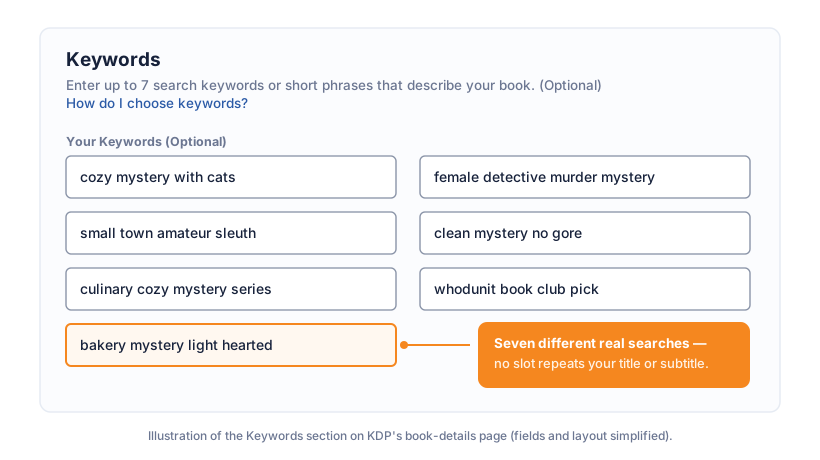
You get up to seven keywords or short phrases, entered during title setup and editable later from your Bookshelf. Each field shows its character limit in the form. They feed Amazon's search indexing; they aren't tags that shoppers browse, and they never appear on your listing.
A couple of things follow from how the indexing works. First, a "keyword" is best treated as a phrase. "Cozy mystery with cats" targets an actual search, whereas "cats" on its own has you competing with the entire pet aisle. Second, your title, subtitle and other metadata are already indexed, which sets up the most important rule of slot economics: never spend a slot repeating them.
What Amazon prohibits
The guidance bans or warns against a specific list of practices. The ones that matter:
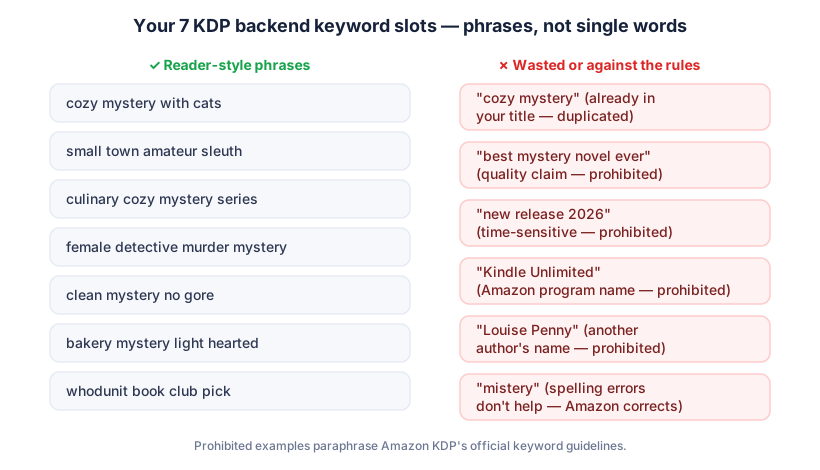
- Duplicating words already in your title, subtitle, categories or author name. Not against the spirit of the rules so much as pointless; those words are indexed anyway, so the slot buys nothing.
- Quality claims like "best novel ever".
- Time-sensitive words: "new", "on sale", "available now".
- Other authors' names, other book titles, or brands you don't own. Of everything on this list, this is the one that creates real account risk.
- Amazon program names such as "Kindle Unlimited" or "KDP Select".
- Quotation marks and HTML.
- Deliberate misspellings. Amazon's search already handles common ones, so "mistery" helps nobody.
Choosing the seven
Amazon's own advice is the whole strategy in three words: think like a reader. Your slots should be seven different real searches that your title doesn't already own. In practice:
- Harvest autocomplete. Type your niche seed into Amazon's search bar and note what it suggests. Those suggestions are real searches, ordered roughly by popularity, and working the alphabet ("cozy mystery a...", "cozy mystery b...") surfaces the long tail. There's a whole article on this.
- Harvest the winners. The recurring words across page-one titles and subtitles in your niche are the tropes readers respond to: "small town", "amateur sleuth", "clean", "series".
- Cover different intent, not synonyms. Seven variations of one phrase all compete for one search. Spread the slots across setting, character, tone, audience and adjacent searches instead.
- Check each phrase has a pulse. Search it on Amazon before committing. If the results are a graveyard of #800,000 ranks, nobody's typing it.
- Fill slots with natural phrases, not comma-stuffed word salads. Amazon matches the words within a slot in any order, and logical phrases are the documented best practice.
A worked example: filling all seven without overlap
Imagine a cozy mystery set in a small-town bakery, titled Murder by the Dozen. The title carries "murder", and let's say the subtitle carries "cozy bakery mystery". Those words are now spoken for, so the seven slots go to work on everything the title and subtitle don't say. One reasonable set:
- small town amateur sleuth
- culinary mystery with recipes
- female detective clean read
- whodunit book club pick
- light hearted funny mystery
- cat cozy mystery series
- baker sleuth murder investigation
Notice what's happening. No slot repeats "murder", "cozy", "bakery" or "mystery" from the title and subtitle. Each one reaches for a different reader: the person who searches by setting, the one who wants recipes, the one who screens for "clean", the book-club organiser, the reader who wants something funny, the series-and-cat crowd, and the one describing the plot to themselves. Seven slots, seven doors in. That's the shape you're aiming for, whatever your genre.
Fiction and non-fiction think differently
The mechanics are identical but the mindset isn't. Fiction readers usually search by experience: genre, trope, tone, setting, "clean" or "spicy", "for fans of" a vibe. Your slots should chase those emotional and categorical searches.
Non-fiction readers search by problem and outcome. Someone buying a budgeting book types "how to pay off debt", "budget for beginners", "money management for couples". They're describing a job they want done. So a non-fiction author's slots should lean hard into problems, audiences and results: the specific pain ("get out of credit card debt"), the audience ("for young adults", "for small business"), and the promised outcome ("save money fast"). The same discipline applies, no title-duplication and no synonyms of one search, but you're mapping needs rather than tropes.
Marketplaces differ, so harvest where you sell
Amazon's search suggestions and competition aren't identical across marketplaces. The .com (US) and .co.uk dropdowns can surface different phrases, spellings ("mum" versus "mom") and even different popular sub-genres. Your KDP keyword fields apply across the marketplaces your book is sold in, so if the bulk of your sales come from one store, harvest your phrases there. If you sell meaningfully in both the US and UK, it's worth checking both dropdowns and favouring phrases that show demand in each, rather than optimising blindly for one and hoping it carries.
 Add to Chrome — it's free
Revisit them twice a year, roughly
Keywords aren't set-and-forget, but they're also not something to fiddle with weekly. Two moments justify a revisit. Around 30 to 90 days after launch you can see what's actually working; if readers keep finding you through a search you never targeted, consolidate on it, and if a slot targets a search where you've never once appeared, spend it elsewhere. And when the niche's language shifts (a few years ago "cozy fantasy" barely existed as a search) the winners' titles on page one are the live dictionary. Changes go through your Bookshelf and typically take effect within a couple of days.
The honest summary
Backend keywords are a modest lever, and anyone selling them as magic is selling something. They won't rescue a book aimed at a dead niche and they can't outrank a weak cover. What they do is make sure that when a reader types a search your book genuinely answers, your book is in the race. Seven slots, seven different real searches, nothing prohibited. That's the entire game.
If you'd rather not do the harvesting by hand, KDP Metric's free Keyword Explorer pulls the autocomplete suggestions for any seed and shows the real competition behind each phrase in a click. The Pro Keyword & Metadata Builder goes further and assembles ready-to-paste slot suggestions from the niche you're browsing, filtered against the rules above so nothing prohibited slips through.
Add to Chrome — it's free