
Articles › Categories
How to Choose Your 3 KDP Categories (Without Guessing)
Published 6 July 2026 · KDP Metric team
KDP hands you three category slots when you publish, and most authors spend them in about ninety seconds, scrolling the picker for whatever sounds roughly right. Then they wonder why the book never troubles a bestseller list. Those three choices deserve more respect: they decide which shelves your book sits on, which "Best Seller" lists it can appear in, and whether a badge is ever within reach.
Here's a way to choose them with evidence instead of vibes.
How the system works, quickly
The official mechanics, from KDP's category help and the sales-ranking page:
- You select up to 3 categories during title setup, through a picker that walks the category tree: category, subcategory, then deeper placements.
- You can change them any time afterwards from your Bookshelf, and new placements typically appear on the listing within 72 hours.
- Your book can show in up to 3 Best Seller category lists, based on its customer activity.
- Relevance is policed. In Amazon's own words, irrelevant categories "create a poor shopping experience", and KDP may re-place a book whose chosen category doesn't match its content.
That last point retired a whole generation of gaming tactics. The thriller parked in an empty poetry sub-category for an easy badge gets moved, and annoyed readers in the meantime. Every method below assumes you're placing the book where it honestly belongs, just strategically within that truth.
Step 1: Let the market tell you where books like yours live
Don't start in the picker. Start on Amazon's storefront, with a search for your niche. Open the top several organic books, scroll each Product details block, and write down the category lines: "#23 in Cozy Animal Mysteries", "#41 in Women Sleuths", and so on.
After five or six books a pattern appears. Two or three sub-categories keep recurring. Those are the niche's real homes, chosen by books that are already succeeding with your future readers. This beats browsing the picker cold, because the picker shows you what categories exist, while the ranked books show you which ones work.
Step 2: Check each candidate's difficulty
For each recurring category, open its Best Sellers list and look at the books at #1 and around #20 — then open those books, because the number you need is on their own pages. The list's #1 and #20 are positions within that list; the overall Best Sellers Rank printed in a book's Product details is the store-wide figure the sales curve is built on, and the two can be worlds apart. Convert those overall BSRs into rough daily sales using the BSR curve. Now you know the entry bar: what it takes to crack the top 20, and what holding #1 demands. As a rough model, #1 in a mid-sized Kindle sub-category runs around 40 sales a day, and the full ladder is here.
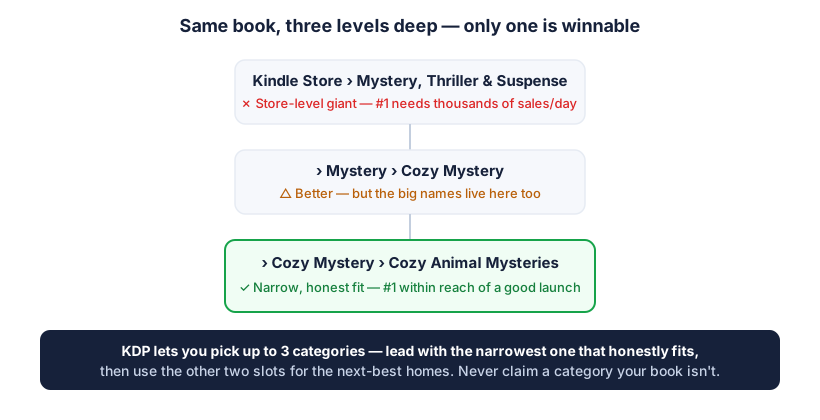
What you're hunting is the narrowest category that honestly fits your book and has a #1 velocity your launch could plausibly approach.
 Add to Chrome — it's free
Step 3: Spend the three slots deliberately
A sensible split, once you know the candidates:
- The badge target. Your narrowest honest fit with a reachable entry bar. This is where your launch push concentrates.
- The traffic shelf. A bigger, busier category where you won't badge soon but where browsing readers actually are. Discovery happens here even at rank #40.
- The wildcard. A second narrow fit serving a different reader intent, or a different facet of the book (the setting rather than the sub-genre, say). If your book straddles audiences, this slot earns its keep.
Two mistakes waste slots more than any others. Choosing three near-identical narrow categories, which triples your badge odds in theory and your reach not at all. And choosing three giants, which puts you on huge shelves where a new book is invisible and no badge will ever come.
Non-fiction plays by slightly different rules
Everything above works for both fiction and non-fiction, but non-fiction authors have an extra consideration. Non-fiction categories map more directly onto real reader intent, and the "right" category is often more clear-cut because your book solves a specific, named problem. A book on sourdough baking belongs in bread-baking categories, full stop; there's less room for the creative angle-hunting that fiction allows.
That clarity cuts both ways. It's easier to know where you belong, but harder to find a soft category, because non-fiction sub-categories tend to be either obviously relevant and competitive, or irrelevant and off-limits. The move is to get as specific as your book honestly allows: not "Cooking" but "Bread Baking", not "Business" but the precise sub-topic your book actually covers. The narrower honest fit is still the badge target; there's just usually less wiggle room to be clever about it. And the relevance rule bites harder here, because a how-to book shelved somewhere misleading disappoints a reader who came for a specific answer, which is exactly the poor experience Amazon says it will re-place a book to prevent.
Step 4: Verify after publishing
Within a few days of going live (allow the 72 hours), check your Product details block. Confirm the book actually displays in categories you expected, and that the ones shown match what you chose. If something looks off, or a category you selected isn't appearing, fix it from the Bookshelf. It's also worth a re-check whenever Amazon reshuffles its category tree, which happens quietly from time to time.
The short version
Read the category lines from the books already winning your niche, measure how hard each recurring category actually is, then spend your three slots as a portfolio: one badge target, one traffic shelf, one wildcard. Verify it stuck. That's the entire method, and every input is public.
The tedious part is the collating, so we automated it: KDP Metric's free Category Finder walks you through a niche's ranked books, reads their category lines, and names the narrowest shared category with its entry bar attached. Pro's Category Hunter goes deeper on how entrenched each list's leaders are. Either way, choose with evidence. Ninety seconds of scrolling the picker is how books end up on shelves nobody visits.
Add to Chrome — it's free