
Articles › BSR & Sales Data
How to Price a Kindle Book: The 70% Royalty Band, and the Cliff at the Top of It
Published 19 July 2026 · Updated 9 September 2026 · KDP Metric team
Pricing is the one decision on the KDP dashboard that changes your income per sale by a factor of five, and it's usually made in about four seconds. Most authors pick £2.99 because everyone else does, or £0.99 because it feels like it'll sell more, and never work out what either choice actually pays.
It's worth working out. And there's a reason to revisit it right now: on 7 July 2026 Amazon raised the ceiling on its 70% royalty band from $9.99 to $12.99 — the first change to that band since it was introduced in 2007. If your pricing strategy was built around the old ceiling, and most advice online still is, it's out of date.
The two royalty options, honestly stated
KDP gives you a choice of two royalty rates, and the choice is constrained by where you set your price.
The 70% option is available on Amazon.com when your list price is between $2.99 and $12.99, and on Amazon.co.uk between £1.77 and £12.99. It only applies to sales in Amazon's list of eligible territories — the US, UK, Canada, Australia, Japan, India, Brazil, Mexico and others. Sales outside those territories pay 35% regardless of your setting.
The 35% option covers everything else: $0.99 to $200.00 on Amazon.com, £0.77 to £150.00 on Amazon.co.uk, available in every territory Amazon sells to.
Two conditions sit on top of the 70% rate that people forget until the money looks wrong:
- Delivery costs are deducted, but only on the 70% option. Amazon charges $0.15/MB on Amazon.com, £0.10/MB on Amazon.co.uk, with a minimum of one cent. The 35% option has no such deduction.
- If you also sell a print edition, your ebook list price must be at least 20% below the print list price on Amazon to qualify for 70%. A £9.99 paperback caps your ebook at £7.99.
The formulas Amazon publishes are refreshingly plain:
Where the money actually lands
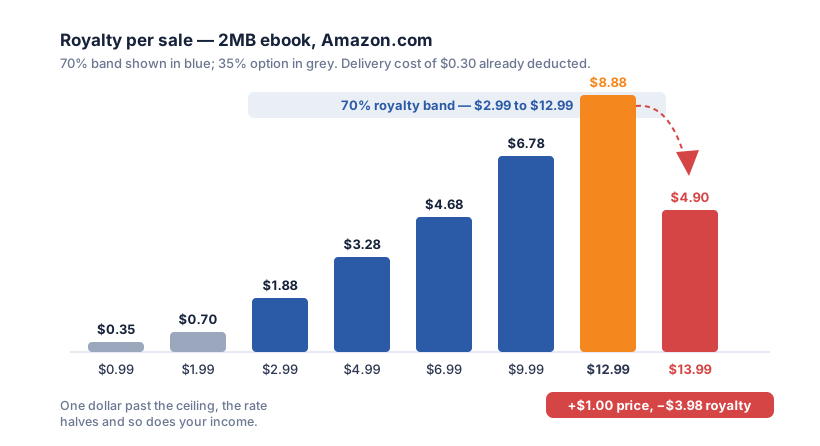
Take a normal text-only novel — call it 2MB, which is generous for a book without images — and run it across the price points. Delivery cost at $0.15/MB comes to $0.30.
| List price | Rate | Royalty per sale |
|---|---|---|
| $0.99 | 35% | $0.35 |
| $1.99 | 35% | $0.70 |
| $2.99 | 70% | $1.88 |
| $4.99 | 70% | $3.28 |
| $6.99 | 70% | $4.68 |
| $9.99 | 70% | $6.78 |
| $12.99 | 70% | $8.88 |
| $13.99 | 35% | $4.90 |
Two things jump out of that table, and both of them matter more than any pricing advice you'll read on a forum.
The gap between $0.99 and $2.99 is enormous. It isn't a threefold price rise, it's a 5.4-fold rise in what you take home. To make the same money at $0.99, you need to sell more than five copies for every one you'd have sold at $2.99. That is a very high bar, and outside of a deliberate loss-leading first-in-series play, it's rarely cleared.
The cliff at the top is brutal. Moving from $12.99 to $13.99 raises your price by a dollar and cuts your royalty by $3.98. There is no price between $12.99 and roughly $25.40 at which the 35% option pays you as much as $12.99 at 70%. If your book is worth more than thirteen dollars, it needs to be worth a lot more.
 Add to Chrome — it's free
The bit that catches non-fiction and children's authors
That $0.30 delivery cost is trivial for a novel. It is not trivial for an illustrated book.
A cookbook, a photography guide, a picture book or a heavily diagrammed technical manual can easily run to 20MB or more. At $0.15/MB that's a $3.00 deduction from every single sale. Price it at $9.99 and you're taking 0.70 × (9.99 − 3.00) = $4.89, not the $6.78 the table above suggests — nearly 30% of your royalty gone to file size.
This is worth actual engineering effort. Compressing images properly before you build the file, choosing sensible dimensions rather than dropping in camera-resolution photographs, and checking the final file size in the KDP dashboard before you publish can put a meaningful amount of money back per copy. And it compounds: it's per sale, forever.
So what should you charge?
There isn't a right answer, but there are defensible ones, and they follow from what kind of market you're in rather than from what feels brave.
Fiction in a Kindle Unlimited genre — romance, most thrillers, much of fantasy. Standard practice is £2.99 to £4.99, and the reason is that the list price is nearly beside the point: most of your readers will borrow rather than buy, so the price is mainly a signal of legitimacy rather than a revenue lever. Too low and the book reads as amateur. How KU pays, and how to spot a KU niche, is a subject of its own.
Fiction sold to buyers — literary, historical, book-club fiction, anything where the readership isn't subscription-heavy. £3.99 to £6.99. These readers are comparing you against traditionally published ebooks that sit at £4.99 to £9.99, and pricing far under that field doesn't read as a bargain so much as a warning.
Non-fiction with a clear practical payoff — professional, business, technical, specialist. This is where the new $12.99 ceiling genuinely changes things. A reader buying a book to solve a work problem is not price-sensitive in the way a reader buying entertainment is, and non-fiction that used to bunch up against $9.99 now has three dollars of headroom at full royalty. If your book was priced at the old ceiling for no reason other than that it was the ceiling, it's worth testing $10.99 or $11.99.
First in a long series — the one genuine case for £0.99 or free, because you're not selling that book, you're buying a reader for books two through eight. It only works if books two through eight exist. A permanently discounted standalone is just a discount.
Two things to stop doing
Stop treating price as a lever you pull once. Amazon lets you change a list price whenever you like, and it takes effect within a few hours. Run a price for a month, look at units and royalty in your KDP reports, then try a different one. The only expensive pricing mistake is the one you never re-examine. One exception worth diarying: scheduling a Kindle Countdown Deal freezes your list price for 30 days before and 14 days after it, so a price test and a countdown can't share a calendar.
Remember the royalty isn't the payment. What you calculate here is what's credited; what arrives is that figure roughly 60 days after the month closes, less any US withholding you haven't dealt with. Neither changes which price to pick, but both change when the money shows up.
Stop pricing against your costs. Your editor's invoice and the eighteen months you spent writing are real, and completely invisible to a reader deciding between your book and four others on a search results page. Price against what comparable books in your niche charge, which you can read straight off page one of any Amazon search — the median price of the books currently winning your niche is the single most useful pricing input you have, and it's free.
Add to Chrome — it's free