
Articles › Fixing a Stuck Book
A+ Content: The Free Half of Your Product Page Most Authors Never Fill In
Published 25 August 2026 · Updated 15 September 2026 · KDP Metric team
Every author agonises over the 4,000-character description box. Almost none of them fill in the second, larger, entirely free block of space sitting further down the same page — images, formatted text and comparison tables, under a heading that reads From the Publisher.
That block is A+ Content. It costs nothing, it's open to KDP authors as standard, and the reason most books don't have it isn't that authors weighed it up and declined. It's that they've been told, repeatedly and wrongly, that they aren't allowed it.
No, you don't need Brand Registry
Search this topic and you'll be told you need Amazon Brand Registry, which needs a registered trademark, which costs money and takes months. That advice is real — it just isn't about you. It's the rule for Amazon sellers listing products through Seller Central, and it has been copied across into author guides by people who never checked whether KDP works the same way.
It doesn't. KDP's own A+ Content page is direct: the feature is free, and it's available for books in your KDP Bookshelf — published titles and pre-orders alike. No trademark, no Brand Registry application, no KDP Select enrolment, no fee. You build it from the Marketing tab in KDP, in the A+ Content Manager, using a set of pre-built modules you drop images and text into.
If you've been putting this off because you assumed there was a paywall or a trademark in front of it, there isn't one, and there never was for KDP books.
Where it appears, and why that changes what you write
A+ Content lands in the From the Publisher section of your detail page. KDP's help page is candid about the placement: the exact location varies, and most readers will need to scroll to see it.
That single detail should shape everything you put there. Nobody reaches A+ Content by accident — a reader gets there by scrolling past the cover, the price, the description and often the review summary. Which means the audience for it is already interested. They aren't deciding whether to look at your book; they're deciding whether to buy it, and they're looking for a reason to say yes.
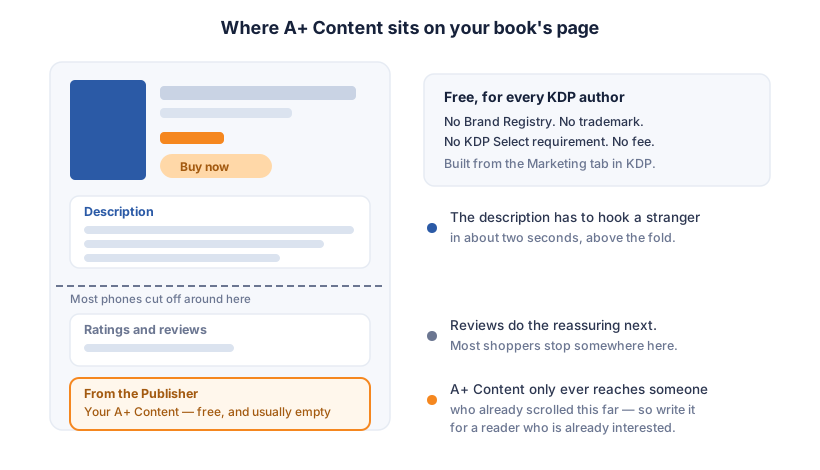
So a description that opens with your strongest hook is right, and A+ Content that repeats that same hook is a wasted slot. The description box does the persuading; A+ Content does the reassuring — the detail, the context and the proof a curious reader wants before committing.
 Add to Chrome — it's free
The rules that get A+ Content rejected
Everything you submit is reviewed against the A+ Content Guidelines, and the rejection reasons are specific enough to be worth knowing before you build rather than after:
- No customer reviews. Quoting your own Amazon reviews is explicitly disallowed, however glowing they are.
- Four quotes, maximum, and only from well-known publications or public figures, each attributed with the name and the publication. Awards need the date and the awarding organisation, and anything more than two years old doesn't qualify.
- No competitors. You can't name or describe another author's book, and comparison charts may only compare books in your own KDP account.
- No pricing or promotional language. Prices, discounts and words like free, bonus, buy now and add to cart are all out — as are time-sensitive words such as new, now, latest and on sale, because the block stays on the page long after the moment they described.
- No links or contact details. Anything that tries to send a reader off Amazon — a URL, an email address, a phone number — is prohibited.
- Images: JPG or PNG, RGB, under 2 MB, at least 72 DPI, no watermarks, nothing blurry, and no text so small it's unreadable on a phone. All-caps text is out.
If the four-quote limit is the binding constraint on you, note that it isn't the only slot for third-party praise on that page. Editorial reviews are a separate feature, managed in Author Central rather than in KDP, and they appear in their own section of the detail page.
What's actually worth putting there
The modules are just containers. The value is in choosing content that answers the question a scrolling reader is silently asking. What works:
- A series order strip. If you write a series, this is the highest-value use of the space — covers in reading order, numbered, so a reader who found book three knows where to start. A comparison chart of your own titles is explicitly allowed, and this is exactly what it's for.
- What's inside, for non-fiction. A clean summary of the sections or the method — the thing a shopper would flip to the contents page to check in a bookshop.
- The author, properly. Not a bio you could have put in the description, but the part that establishes why you specifically wrote this book.
- A visual the description can't carry. A map for a fantasy novel, sample interior pages for an illustrated or workbook-style title, a before-and-after for a practical guide.
What doesn't work is a restated blurb in a bigger font, or a wall of text set as an image — which fails both the readability rule and the reader.
Eight business days, and what to check afterwards
Compliant content appears on your detail page within eight business days of submission, and longer in high-volume periods — so this isn't a launch-day task you can leave until launch day. Build it during the pre-order window, or on a book that's already live.
It's supported across thirteen Amazon marketplaces, including .com, .co.uk, .de, .fr, .es, .it, .nl, .ca, .com.au, .com.br, .com.mx and .in, with Japan managed through a separate portal. Once it's live, open your own product page on a phone as well as a desktop — the modules reflow at mobile width, and text that felt comfortable in the editor is usually the text that turns unreadable on a phone. That's the check the guidelines are pointing at when they rule out small text, and it's the one nobody does.
A+ Content is one of the few genuinely free upgrades left on a KDP listing, and it's sitting unused on most of the books competing with yours. If you want to see which of those competitors have bothered — and what else they're doing that you aren't — KDP Metric's free Strategy Coach reads any book's page alongside its niche data and tells you which of the fixable things are actually missing.
Add to Chrome — it's free