
Articles › Fixing a Stuck Book
Author Central and the Follow Button: The Channel Sitting Outside Your KDP Account
Published 15 September 2026 · KDP Metric team
Every marketing article written for self-published authors eventually arrives at the same advice: build a mailing list, because it's the only audience you own. It's good advice and it's also a year-long project that starts from zero.
Meanwhile, Amazon operates a follow mechanism attached to your name, which notifies people when you publish, costs nothing, and requires a single afternoon to set up. Most authors don't have it — not because they decided against it, but because it lives on a platform separate from KDP, and nothing in the KDP publishing flow tells you it exists.
Author Central is a different product
This is the misunderstanding that keeps the rest from happening. Amazon Author Central is a separate platform from KDP, with its own registration. Publishing a book through KDP does not create an Author Page for you; as KDP's own documentation puts it, an Author Page doesn't come standard with use of KDP and you need to register for an Author Central account to have one.
So there are two accounts in an author's life, and they do different jobs:
- KDP is where the book lives — manuscript, cover, price, categories, keywords, royalties.
- Author Central is where you live — biography, photo, the Follow relationship, editorial reviews, and a consolidated view of your titles.
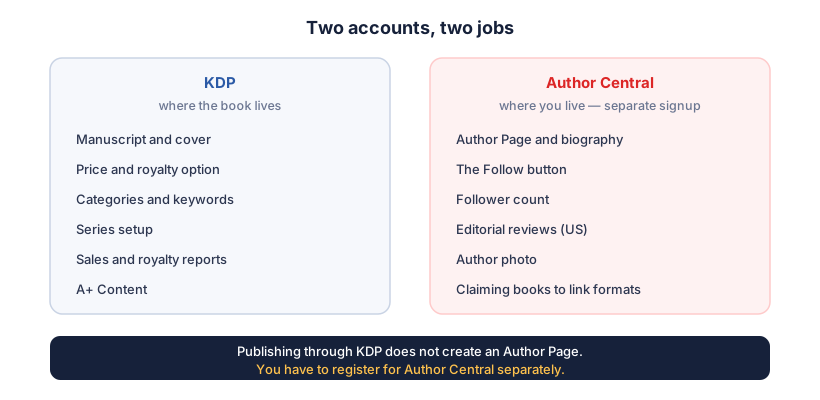
What Author Central gives you access to: adding your books to your author profile, managing biographical information — including biographies in different languages — checking sales rankings and customer reviews, adding editorial reviews, and seeing your follower count.
The Follow button
On your Author Page and on your books' detail pages, Amazon shows a Follow button. A reader who clicks it is added to your followers, and Amazon undertakes to tell them when you have something new.
That's the part worth appreciating: it's an audience collected at the exact moment of maximum interest — the reader has just finished your book, or is looking at it — with no form to fill in, no email address to hand over, and no double opt-in to survive. The friction is one click, which is roughly a tenth of the friction of any mailing list signup you will ever build.
It is not a mailing list you own, and shouldn't be confused for one — more on exactly where it falls short below. But it costs nothing and accumulates quietly for as long as your books are on sale.
The three conditions on a follower notification
Here's where honesty matters more than enthusiasm, because "your followers get told when you publish" is true only with qualifications, and KDP states them. Followers are notified of a new release or pre-order availability if:
- The book is eligible;
- The follower allows marketing emails from Amazon; and
- They haven't already ordered the new book.
Condition two does most of the damage. A meaningful share of any follower list has Amazon marketing email switched off, and those people will not hear from you this way no matter how many books you publish. So treat the follower count as a soft asset with real but unpredictable reach, not as a send list with a known open rate.
Amazon's documentation also indicates it considers sending emails when an author submits at least three new book recommendations — a mechanism worth knowing exists, though it's Amazon's decision rather than a button you press.
What it won't do
Worth being blunt about the limits, because the gap between "free audience" and "audience you control" is where authors get disappointed:
- You can't export it. There's no list to download, no addresses, no names.
- You can't write to them. There's no compose box. Amazon sends what Amazon decides to send, when it decides to send it.
- You can't segment it, or tell which followers came from which book.
- You can't measure it properly. You see a follower count, not delivery or open rates, so you'll never know what share of a release announcement actually landed.
- You don't own the relationship. It exists inside Amazon's account system, on Amazon's terms.
Which is the argument for doing both rather than choosing. The Follow button captures the overwhelming majority of readers who would never hand over an email address — one click, at the moment of peak interest. A mailing list captures far fewer people, but they're people you can reach on a date you choose, with a message you wrote, about a book on any retailer. The two collect different audiences, and neither substitutes for the other.
 Add to Chrome — it's free
Editorial reviews: the underused part
Buried in Author Central is a feature most authors never touch: editorial reviews (currently a US-marketplace feature). These appear on your book's detail page as quoted praise — from a publication, a reviewer, an author endorsement — in a section distinct from customer reviews.
It's worth pairing this with what you can't do elsewhere. A+ Content explicitly forbids quoting your Amazon customer reviews, and limits you to four quotes from well-known publications or public figures. Editorial reviews are the other, separate slot for third-party praise on the same page. If you have a genuine review from a trade publication, a blurb from a recognised author in your genre, or coverage worth quoting, this is where it goes — and an empty editorial reviews section is a free credibility signal left unused.
What it isn't: a place to invent praise, or to quote your own five-star Amazon reviews back at shoppers. The same instinct that gets A+ Content rejected applies here.
Marketplace coverage, and the bit that surprises people
Author Central is fully available on Amazon.com, Amazon.co.uk, Amazon.de, Amazon.fr, Amazon.co.jp and Amazon.com.br — each with its own editable page.
Author Pages also exist in several other markets, including India, Italy, Spain, Australia, Canada and Mexico — but those pull their information from the US marketplace and can't be edited locally. So your .com biography is doing duty in stores you may never have thought about, which is an argument for writing it to travel: light on US-specific references, clear about what you write rather than where you're from.
That also interacts with Kindle Translate. If you're putting translated editions into the German or Spanish stores, Author Central's support for biographies in different languages on the fully-supported marketplaces is the difference between a German reader finding an author who writes in German and one who evidently doesn't.
The linking bonus
One practical side effect worth the registration on its own: claiming your books in Author Central helps Amazon link your formats together on a single detail page, once the underlying metadata matches.
That's the failure described in the series pages article — eBook and paperback sitting on separate listings, splitting reviews and rank, looking to a shopper like two different books. Author Central won't override a genuine metadata mismatch, but for books where everything already matches and linking simply hasn't happened, claiming them is part of the fix.
A setup checklist
Roughly an afternoon, once, for the life of your catalogue:
- Register at Author Central with the same Amazon account you buy books with, and claim every title you've published — including formats and pen names.
- Write the biography properly. Third person, what you write and why someone should trust you on it, no life story. Remember it's showing in stores you didn't write it for.
- Add a photo. A face materially outperforms a blank silhouette for the small credibility judgement a shopper makes in two seconds.
- Add editorial reviews if you have anything legitimate to quote.
- Check your books are all claimed and linked — the format selector should appear on each detail page.
- Add the Follow button to your own funnels: back matter of your books, your website, anywhere you'd otherwise say "follow me on social media". It's a click, and it reaches people at the moment they've just finished reading you.
- Set up the pages on the other supported marketplaces — .co.uk and .de especially, if you sell there — since those are editable independently.
None of this moves a book that nobody can find, which is a different problem with a different fix. But for an author whose books do sell, it's the cheapest compounding asset Amazon offers: every reader who finds book one becomes someone Amazon might tell about book four.
Whether book four has a niche worth writing into is the question we automate — KDP Metric's free Niche Grade reads the competition on any Amazon search page, so the next book is chosen on evidence rather than on what the last one happened to be about.
Add to Chrome — it's free