
Articles › Fixing a Stuck Book
Series Pages: How Amazon Links Your Books, and Why Yours Probably Isn't
Published 4 September 2026 · KDP Metric team
For a series author, almost none of the money is in book one. Book one is the advertisement. The business is what happens in the forty-eight hours after a reader finishes it — whether they find book two in three seconds or give up looking.
That entire transaction happens on a page most authors have never deliberately set up, and which Amazon will not build properly on your behalf if your metadata doesn't cooperate. Series pages are free, they're created from your own Bookshelf, and the failure modes are specific enough to check in a quarter of an hour. Here's the whole mechanism, from KDP's own series documentation.
What a series page actually is
It's a dedicated Amazon page holding every book in your series, in the order you specify, with its own description — separate from any individual book's detail page. A reader who lands on book three can see the whole run, numbered, and start at the beginning.
You create one in one of two places, both inside your KDP Bookshelf:
- From scratch: click + Create new title or series, then choose Create series page.
- From a book you've already published: click the ellipsis (…) next to the title and choose Add to series.
Two details in KDP's documentation defuse the most common reasons authors put this off. You can start a series in any format — eBook, paperback or hardcover — and you do not need the series finished, or even mostly written, before you create it. Books can be added or removed at any time, so a series page with one book in it today is a perfectly sensible thing to own.
Once you have live titles, the page appears within 72 hours. If you set the series up before anything is published, it appears within 72 hours of your first title going live. So this is a task for the pre-order window, not for launch day.
Ordered or unordered — the choice that changes the page
KDP asks you to declare which kind of series you have, and it isn't a cosmetic setting.
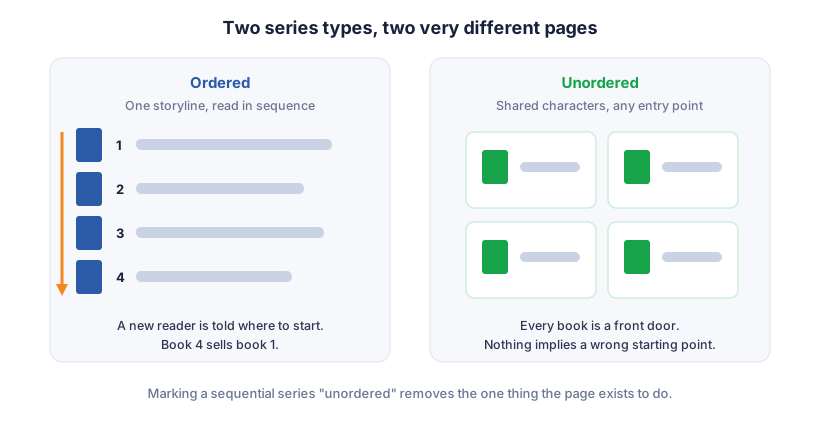
Ordered is for a series with one storyline running through it, meant to be read in sequence — the seven-book fantasy arc, the trilogy, the continuing case files where book four spoils book two. Titles display in your specified numerical order.
Unordered is for books that share characteristics but stand alone — the recurring-detective format where any case is a reasonable entry point, or a non-fiction set covering different topics under one banner.
Choosing "unordered" for a genuinely sequential series is the more expensive mistake of the two, because it removes the single most useful thing the page does: telling a reader where to start. Choosing "ordered" for standalones is milder but still costs you, because it implies a reader has to go back to the beginning before they can buy the book they're actually holding.
You change the order any time from Manage Series → Edit book order in your Bookshelf, renumbering and saving. One wrinkle worth knowing: related content — the extras you attach rather than the main run — displays in the order it was added to the series, not in an order you set. So add those deliberately rather than in whatever sequence you happen to find them.
 Add to Chrome — it's free
The linking problem: when your own formats won't sit together
This is the failure that costs the most and gets diagnosed the least, because it doesn't look like a failure. Your eBook and paperback are supposed to appear on one detail page, with a format selector letting a reader switch between them. When they don't, you have two listings competing with each other, splitting reviews, splitting rank, and looking to a shopper like two different books.
The cause is almost always metadata. Amazon's linking system matches editions on a specific set of fields:
- Title and subtitle
- Author and contributor names
- Series information
- Language
- Edition and volume numbers
- Interior type — black-and-white versus colour, for print
Any variation in any of those prevents automatic linking. Not a big variation — any. "J. R. Smith" on the eBook and "J.R. Smith" on the paperback is enough. A subtitle on one format that you trimmed on the other is enough. A series name entered as "The Ashcombe Files" in one place and "Ashcombe Files" in another is enough.
Two more things worth knowing before you go hunting for support: linking takes up to a week after each edition goes live, so a two-day-old paperback that hasn't linked yet isn't broken, it's pending. And claiming your books in Author Central helps the process along once the metadata does match. If it still hasn't linked after that, KDP support can do it by hand — they'll want your eBook's ASIN and the 10-digit ISBN of the print edition, and linking only works when all formats were published through KDP under the same account.
What the series page can and can't hold
A few boundaries that save you a support ticket:
- Kindle box sets can be added to a series as related content — useful, since a box set is often the highest-value item you sell and it deserves to be visible from the series page.
- Bundled paperback sets aren't supported in the same way.
- Series-wide discounts don't exist. There's no mechanism to price the series as a unit, so any "buy the series, save 20%" plan has to be built out of individual prices and a box set.
- Multiple-author series — anthologies, shared worlds, co-written runs — need KDP support involved rather than being self-serve.
Why this is worth fifteen minutes
The page-one analysis on this site makes the case from the outside: when one author's series occupies half of page one, the barrier to entry in that niche is high precisely because their read-through is working. A reader entering that niche gets absorbed into an existing series and never comes back to browse.
The series page is the mechanism underneath that. It's how a reader who found you through one book becomes a reader of six. And unlike ads, covers, or reviews, it costs nothing, takes one sitting, and doesn't degrade.
The 15-minute audit
Open your own series as a shopper would, in a private browsing window, and check:
- Does a series page exist at all? Search your series name on Amazon. If nothing comes back and you have two or more live titles, you never created one.
- Is every book on it? Including the box set, the prequel novella, the one you published under a slightly different series name.
- Is the reading order right, and does ordered-versus-unordered match how the books actually read?
- Does each book show all its formats on one page? Click a title, look for the format selector. If the paperback has its own separate listing, you have a linking mismatch.
- Is the series name spelled identically across every format of every book — same capitalisation, same punctuation, no stray "The"?
- Does the series description exist, and does it sell the series rather than repeating book one's blurb?
Every one of those is fixable from your own Bookshelf in an afternoon, and none of it needs a new cover, a new ad budget, or a rewrite.
Working out whether the niche you're building that series into can support one is the harder question, and the one we automate: KDP Metric's free Niche Grade reads any Amazon search page and shows you how much of it is already owned by established series, so you know whether you're building into open ground or into someone else's back catalogue.
Add to Chrome — it's free