
Articles › Categories
Beyond Your 3 Categories: What Actually Works in 2026 (The Keyword Trick Is Dead)
Published 24 August 2026 · KDP Metric team
Search "get more than 3 Amazon categories" and you'll land on two pieces of advice that were once true and have since been quietly retired: stuff a specific keyword into your backend slots to unlock a hidden category, or email KDP support and ask for up to ten. Both worked, once. Neither works now, and advice that doesn't say so is advice written for an Amazon that no longer exists.
Here's what actually happened to both tricks, and — more usefully — what genuinely still expands a book's category reach today.
The keyword trick: real, then retired
For years, Amazon maintained an official mapping between specific backend keywords and browse categories the standard picker didn't expose — a word like "Arthurian" tucked into your seven slots could place a book into an Arthurian Legend category no dropdown offered directly. It was documented on Amazon's own help pages.
That page no longer exists, and the mechanism it described no longer functions. This isn't a rumour — it's the conclusion of authors and researchers who track KDP's mechanics closely, after the archived page and the behaviour it described both stopped working. If a guide today tells you to add a specific word to your keywords to "unlock" a category, it's describing a system that was switched off some time ago. Spend that slot on a real search a reader types instead — that's the only job backend keywords still do.
The email-support trick: also retired
The second workaround was more direct: contact KDP support through Author Central, name up to ten categories, and ask. Amazon stopped accepting these requests in mid-2023. The reason lines up with something the main category-picking guide already covers: Amazon polices category relevance because an irrelevant placement is, in its own words, a poor shopping experience — and the request-based system had become the main way authors gamed their way into empty categories purely to chase an easy bestseller badge. Closing it off was a blunt fix for a real abuse problem.
Today, the picker's 3-category limit is enforced in the system, full stop. There is no support ticket that reopens it.
 Add to Chrome — it's free
What genuinely still works: one book, up to nine placements
Here's the lever that's still live, still official, and quietly under-used: eBook, paperback and hardcover are separate listings, and each one gets its own 3-category picker, set independently under that format's own "Edit Details" screen in your Bookshelf.
Publish the same book in all three formats and you don't have three categories to work with — you have up to nine, three per format, and nothing requires them to match.
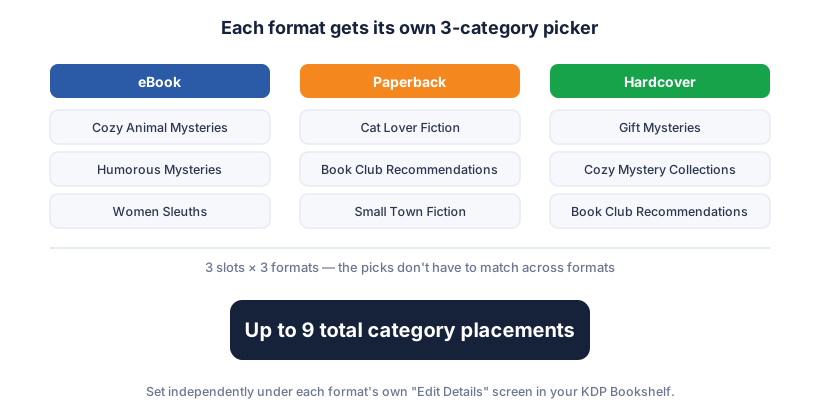
That's not a loophole; it's just an underused feature of how KDP is structured, and it's worth using deliberately rather than by accident:
- Don't just copy the same three categories into every format. A shopper browsing paperbacks is often shopping differently than a Kindle Unlimited reader — gift buying, physical shelf presence, a slower, more deliberate browse. Point your paperback's picks at categories that reflect that shopper, even if they diverge from your ebook's.
- Use the extra slots for a genuinely different facet of the book, not a weaker copy of the same niche — a setting-based category on one format, a trope-based category on another, following the same "narrowest honest fit" logic the main category guide lays out, just applied three times instead of once.
- Verify each format separately after the usual 72-hour propagation window. Formats are edited independently, so a mistake on one doesn't show up when you check another.
The other real lever: reading age
Separately from any of the three-slot pickers, there's a field called Primary Audience → Reading Age, and it does something the category picker alone can't: it's the gate on Children's and Teen & Young Adult category eligibility. Amazon's own guidance is direct about it — without an appropriate reading age set, a children's or YA book "may not be eligible for your selected Children's or Teen & Young Adult categories and it will not appear in age-specific search results," even if you picked exactly the right category by hand.
One more wrinkle worth knowing before it surprises you: once real customers leave enough signal for Amazon to infer a customer-recommended reading age, that figure takes priority, and you lose the ability to change the field yourself through KDP. The window to set it deliberately is early, not indefinite.
Put together
Nine category placements from three formats, each pointed at the sharpest honest niche for that format's actual shopper, plus a correctly set reading age if the book is for children or teens — that's the whole of what's real today. It's less dramatic than a keyword hack that quietly unlocks a hidden shelf, but it's the version that's still true, and it's entirely inside the rules Amazon still enforces.
Finding which categories are worth those nine slots is still the hard part, and it's the part we automate: KDP Metric's free Category Finder reads the categories actually working for ranked books in any niche you search, so you're spending real slots on real evidence rather than a picker list and a guess.
Add to Chrome — it's free