
Articles › Keywords & Metadata
Amazon Ads for KDP Authors: Sponsored Products, From Zero
Published 17 August 2026 · KDP Metric team
Backend keywords and autocomplete research earn you a place in organic search — the free rows a shopper scrolls past. Amazon Ads is the separate, paid layer sitting on top of that, and it's the part of KDP's ecosystem most authors either ignore completely or turn on without understanding what they just switched on. Neither is a great outcome: ignoring it leaves a real discovery channel unused, and switching it on blind is how a first-time advertiser burns through a budget in a weekend and swears off ads forever.
Here's how it actually works, sourced from KDP's own advertising help page.
What you're allowed to run
KDP authors have access to two ad formats.
Sponsored Products is the one almost every author means when they say "I run ads." It's cost-per-click: you only pay when someone clicks your ad, never for the impression itself. Sponsored Products ads surface inside search results and on other books' product pages, styled to match the surrounding listings and carrying a small "Sponsored" label — the same label the search-results anatomy piece shows sitting next to the organic rows.
Sponsored Brands is a bigger ask, and most authors aren't eligible on day one. It requires at least one pen name with three unique published titles in your Author Central account — pre-orders don't count, they need to be live. In exchange, it buys you a showcase unit (a small storefront strip of your books) or a video ad, rather than a single-book listing. Think of it as the format for once you have a backlist, not a launch tool for book one.
Before either format will run, your books need to be added to Amazon Author Central, and every ad goes through moderation — Amazon's own review process, typically resolved within 24 hours but stated to take up to 3 business days.
Automatic vs manual targeting
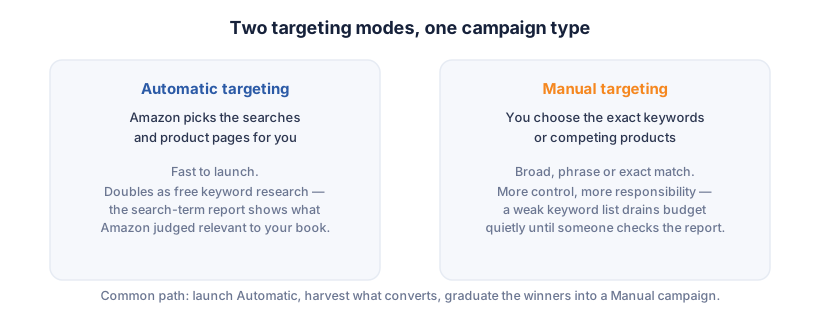
Sponsored Products campaigns come in two targeting modes, and they do fundamentally different jobs.
Automatic targeting hands Amazon the wheel. You give it your book; Amazon decides which searches and which product pages to show your ad against, based on your listing's own metadata. It's the fast way to launch, and it's also a research tool in disguise — the search terms it spends money on are terms Amazon's own systems judged relevant to your book, which is free competitive intelligence you didn't have to ask for.
Manual targeting hands you the wheel instead. You choose the exact keywords or the exact competing products to bid against, with the standard match-type controls: broad (catches variations and related terms), phrase (the words in that order, with padding allowed either side) and exact (only that precise search). This is where control lives, and it's also where a badly chosen keyword list quietly drains a budget for weeks before anyone checks the report.
 Add to Chrome — it's free
Your ad keywords are not your backend keywords
This is the mix-up that costs authors the most, so it's worth stating plainly: the 7 keyword slots in your book's metadata and the keywords in a manual Sponsored Products campaign are two completely separate systems. Filling one does nothing to the other.
Your 7 backend keyword slots feed organic indexing — they're free, permanent, and invisible to shoppers. A manual ad campaign's keyword list decides which paid placements you bid on, and every match costs money per click. The research method is identical (harvest autocomplete, read what's ranking in your niche, think like a reader), but the two lists don't have to match, and there's no penalty for a phrase appearing in both.
What it costs, honestly
Amazon doesn't publish a fixed minimum daily budget for Sponsored Products, and be wary of any guide that states one as if it were a rule — it isn't. What Amazon's own page says is that you set your own bid per click and your own budget, full stop, and Sponsored Products is a daily budget only — there's no lifetime-budget option the way Sponsored Brands has. In practice, most authors running a first test keep the daily budget small enough that a bad week is a learning cost, not a real loss, and widen it once a campaign's numbers say something worth scaling.
The number that actually tells you if a campaign is working is ACOS — Advertising Cost of Sale, your ad spend divided by the sales revenue it's credited with. The trap is comparing that spend against your book's list price when what you actually keep is your royalty. A $4.99 ebook at 70% nets you roughly $3.28 after delivery cost (the full pricing breakdown is here); if a click-through sale costs you more than that in ad spend, the campaign lost money on that unit regardless of what the ACOS percentage looks like against list price. Work out your real per-copy royalty first, in every format you're advertising, then treat that number — not the sticker price — as your actual break-even line.
Geography and language, briefly
Sponsored ads for KDP titles run in a defined set of marketplaces — the US, Canada, Mexico, UK, Germany, Italy, Spain, France, the Netherlands, India, Australia and Japan among them — so a book selling mainly outside those stores won't have ads to run yet. And if you publish the same title in more than one language, KDP's ad policy expects the language to be disclosed in the title itself (the familiar "(French Edition)" pattern), which matters for ad approval as much as for the listing itself.
Where to actually start
Launch a single Automatic campaign at a modest daily budget and leave it alone for a couple of weeks — resist the urge to touch it daily, because a book selling one or two copies a day generates too little data to judge in 48 hours, the same patience the stuck-book diagnostic asks for with organic changes. Pull the search term report once you have real data, harvest the phrases that actually converted, and graduate those into a Manual campaign where you control the bid. What you're building, slowly, is a keyword list Amazon's own customers proved converts — which is a far better source than guessing at launch.
KDP Metric doesn't run your ad campaigns, but the same free Niche Grade that reads a search page's organic competition also shows you how many Sponsored rows are running in a niche before you spend a penny — a crowded ad rail is as useful a signal as a crowded organic one.
Add to Chrome — it's free