
Articles › Comparisons
Should You Apply DRM to Your Kindle Book? What Changed on 20 January 2026
Published 2 September 2026 · KDP Metric team
There's a checkbox in the KDP publishing flow marked Digital Rights Management, most authors tick it out of vague anxiety about piracy, and until recently the decision was close to invisible either way — a setting that changed nothing a reader would notice.
That stopped being true on 20 January 2026. DRM-free books now do something DRM'd books can't, the difference is visible to the people who buy your book, and the accompanying detail nobody mentions is that older titles were deliberately left out of it. Here's the whole picture, from KDP's own DRM page.
What DRM actually does
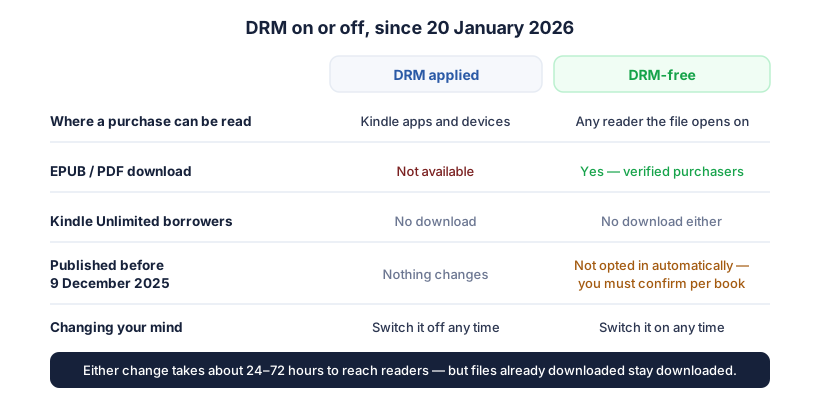
DRM restricts where a purchased copy can be read: with it applied, the file works in Kindle apps and on Kindle devices, and nowhere else. Without it, the same purchase can be moved onto readers from other ecosystems — a Kobo, a Boox, a phone app that isn't Amazon's.
That's the entire mechanism. It is a restriction on where a legitimate purchase can be opened, not a shield against a determined pirate, and conflating the two is what drives most of the anxiety around the setting. The practical question isn't "do I want to stop piracy" — it's "do I want the person who paid for this book to be able to read it on the device they own".
What changed on 20 January 2026
From that date, verified purchasers of a DRM-free book can download it as EPUB and PDF from Amazon's Manage Your Content and Devices page. Three qualifications matter, and each one catches people out:
Borrowers are excluded. Readers who got your book through Kindle Unlimited or another borrowing service can't download the files, even when the book is DRM-free. The download is for people who actually bought a copy — which, if you're enrolled in KDP Select and most of your reads are borrows, means this affects a smaller slice of your readership than it first appears.
Older books were not opted in. For titles published before 9 December 2025 without DRM, Amazon does not switch the download option on automatically. KDP's page is explicit that you must confirm that choice yourself, through the settings on the book. So a back catalogue you published DRM-free years ago is, by default, not offering downloads today — if you want the new behaviour on those books, it's a deliberate action per title.
Downloads are permanent once taken. If a reader downloaded the EPUB or PDF while the book was DRM-free, they keep that file even if you later apply DRM. The setting governs what happens next, not what already happened.
 Add to Chrome — it's free
The "permanent choice" isn't one
The single most repeated claim about this setting is that you choose once, at publication, and live with it forever. KDP's page today says otherwise, in one line: you have full control over your DRM settings and can change them at any time.
That reframes the decision entirely. It isn't a one-way door you agonise over at 2am before hitting publish — it's an ordinary setting on a live book, and a change takes roughly 24 to 72 hours to reach readers. It's also an in-place edit rather than a new edition: unlike the fields that fork your book onto a new ASIN — language, edition number, ISBN choice, trim size — DRM is described as something you change on the book you already have, so your reviews and rank history aren't in the conversation.
So which should you pick?
The honest answer is that this is a smaller decision than the internet's volume on the subject suggests, and it turns on what kind of reader you have.
Leave DRM off if your readers are the sort who own non-Kindle hardware, or if you'd rather a paying customer never hit a wall trying to read something they bought. In genres with technically-literate audiences — science fiction, programming, anything with a strong Linux-adjacent readership — DRM-free is quietly a selling point, and it's the option that makes the new download feature work for you at all.
Apply DRM if the thought of a loose EPUB circulating genuinely bothers you more than the friction it creates for legitimate buyers. That's a preference, not a mistake, and Amazon's page doesn't tie the setting to royalties, Kindle Unlimited eligibility or anything else in your KDP account.
What shouldn't drive it is the piracy argument in either direction. Books that get pirated get pirated regardless of the setting, and nothing in KDP's documentation claims DRM affects visibility, ranking or earnings — that belongs in the same folklore pile as the ranking rules Amazon never wrote down.
If you're going to change it, change it deliberately
Pick a position for your catalogue rather than defaulting per book, apply it consistently, and if you're switching a back catalogue to DRM-free, remember the pre-December 2025 titles need confirming one at a time — the setting alone isn't enough for them.
Then leave it alone long enough to mean something. A change takes up to three days to reach readers, and the effect on sales, if any, is far too small to read from a week of noisy daily numbers. KDP Metric's free Book Tracking follows your title's rank over time, so if you do flip the setting you're comparing an actual trend line rather than a feeling about last Tuesday.
Add to Chrome — it's free